Welcome
to HTML Progress
This is where I will post progress of my hard coded html website. I do this to practice coding, and then I will start changing the design.

First and Second Day
I didn't take a progress shot on the first day. but most progress came on the second. I read through all the content on the jleung wixsite involving html. I started with just a title (of the website and using the <title> tag). On the next day I used the basics of display:flex; to make the navigation bar. It doesn't go anywhere yet. I will change the color once I am done
Third Day
On day three I started by cleaning up my css and making a stylesheet. This way, all future pages will have the same style without all the copy pasting. I also set up a grid and coloring for articles. I made content float around the images and added small content with filler text. I make hyperlinks turn red and underlined when hovered over. The progress photos link now works, however no content has been added to the page.

Fourth Day

On day four I changed the background color and edited the articles. Now, the titles have a box and the colors are nicer on the eyes. I have not yet changed the navigation bar, but once I have a logo design, I will do that along with making the icon in the tab have that logo.
Then, I made the boxes have different sizes. I haven't added any real new articles except the one on the Temu-Amazon one. The boxes now have fixed size, and it would have been easier to make is a flex, but I stuck with a grid. I also increased the text spacing.

Fifth Day
Today I just changed the navigation bar. I got used o seeing the purple up there, and it is definitely subject to change. I will make "Callum's Directory" an image and style it later.

Sixth Day
I started filling out the page for Progress Photos. It is mostly the same content as on here. I used the same grid but just made the boxes span 2 columns. I will merge Work Explanation here and make a new page for something else, but I don't know what yet. I also added a read more link, but I will remove it later and reuse it for something else. It was interesting to learn how to use relative and absolute position though.


Part 1 of html project
Basic HTML. The only CSS is a padding in the body.

Part 2 of html project
Flipping images with just CSS and HTML. Though mostly CSS. Works by stacking the text and the Image, the text already flipped. thus, when hovered over, the image flips and becomes invisible and the text unflips to become visible.
Home page of the quiz. Has functioning carousel, dynamic buttons, tables, ul and ols, button pop ups, and a video.


Exhibits page has sortable categories of sea life. Uses more javascript to categorize and insert with text.
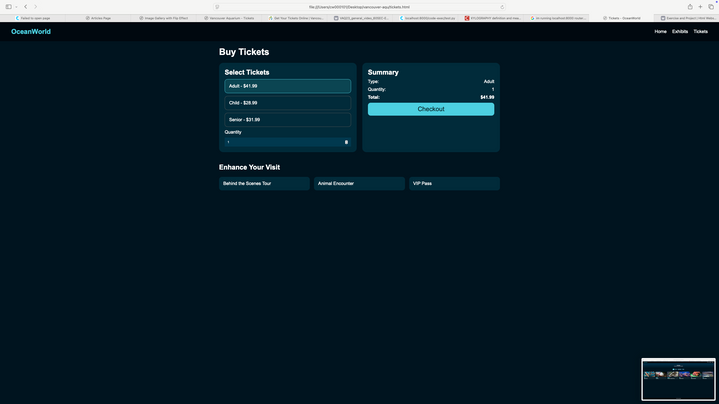
Tickets page that calculates cost of tickets on the right with js.